


Managing money from a phone is convenient, but convenience only matters when the account controls are clear and the app feels dependable during ordinary, sometimes stressful moments. I spent time looking at Money Network® as a finance app rather than treating it like a general banking replacement. Its purpose is focused: giving Money Network account holders a mobile way to check and manage their account information. That narrow role is also the key to judging it fairly.
The app is free to download and is suitable for Everyone, which makes it approachable for a wide range of users. It comes from Fiserv, Incorporated, and has been available since March 26, 2013. The current version is 20.0.1, with Android support beginning at version 7.0. Those details suggest a product with a long history and broad device compatibility, although an older supported operating system does not automatically mean every phone will offer the same experience.
What I found when judging trust and everyday control
A focused account companion rather than a complete financial hub
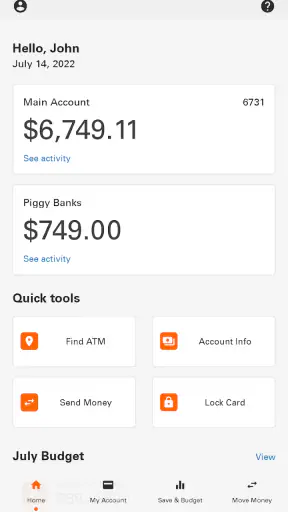
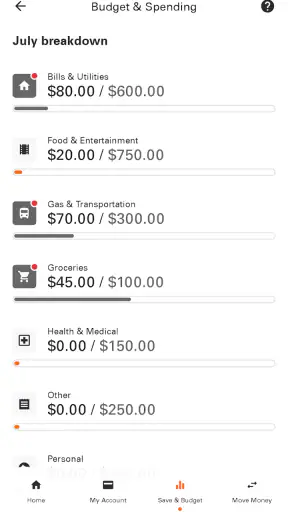
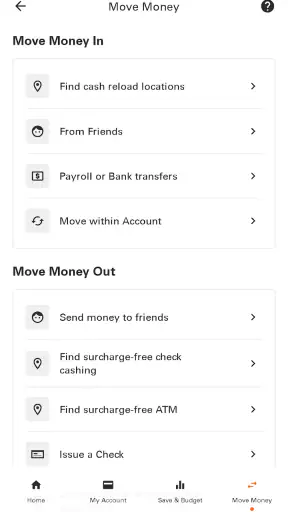
My first impression is that this is best understood as a companion for an existing Money Network account. I would not install it expecting the broad budgeting tools, investment dashboards, bill negotiation, or account aggregation found in larger personal-finance platforms. Its value is more practical: opening the app when I need to see what is happening with my Money Network account without reaching for a desktop browser or relying on paper information.
That distinction matters when deciding whether to use it. Someone who already receives or uses a Money Network account may appreciate having account information available away from a computer. Someone looking for a single place to connect several banks, credit cards, loans, and savings goals will probably find the app too specialized. In that situation, a full personal-finance manager may be a better fit, while this app remains useful for the specific account it supports.
The public response is mixed but substantial. The app holds an average rating of 3.1 from around 72 thousand ratings, alongside roughly 36 thousand written reviews. It has passed 5 million installs. I read those figures as evidence that the app is widely used, not as proof that every user has the same experience. A large audience can reveal recurring friction, but it can also include many different account situations and phone environments.
The trust question starts with account access
For a finance app, the first trust test is not visual polish. It is whether I understand what I am opening, what account it connects to, and what I can do once inside. Money Network’s focused identity helps here: I would use it for Money Network account information, not as a mysterious all-purpose wallet. That makes the decision to install it easier for an existing account holder than for someone who has no relationship with the service.
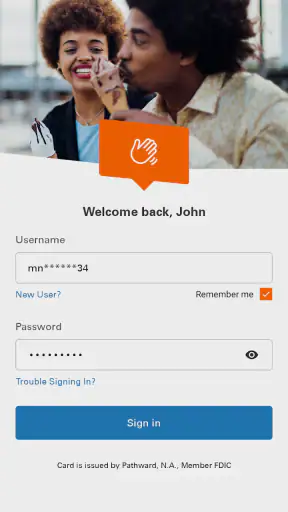
I would still approach sign-in carefully. Before entering credentials, I would confirm that the app is the official Money Network application from Fiserv, Incorporated, and I would avoid installing similarly named copies from unfamiliar publishers. I would also keep the phone’s operating system and screen lock current. These are simple habits, but they matter more for a finance app than for a casual utility.
One useful routine is to open the app only when I have a specific question: checking available account information, reviewing a recent change, or confirming that the account view matches what I expected. That approach reduces aimless browsing and makes unusual activity easier to notice. If something looks wrong, I would record the date, amount, and description before contacting the appropriate support channel rather than repeatedly refreshing and hoping the display changes.
Controls should be judged by what the user can verify
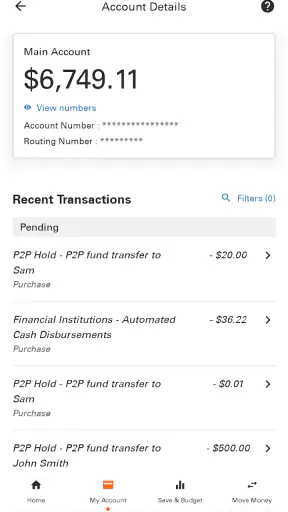
I prefer finance apps that let me make decisions from visible information instead of pushing me toward assumptions. With this app, the most important control is the account view itself: I want to know what information is being shown, whether it is current enough for the decision I am making, and whether an item needs follow-up elsewhere. A displayed balance is useful for orientation, but I would not treat it as a substitute for checking transaction details when timing matters.
This is especially important before spending. Imagine I am standing at a grocery checkout and checking the app to decide whether the purchase fits my available funds. I would use the displayed information as a quick guide, but I would leave room for a pending item, a delayed update, or a transaction I have not recognized. The app can shorten the process of checking an account; it cannot remove the need for judgment.
A second helpful workflow is to review the account after a meaningful event rather than only before spending. After using the account for travel, a larger purchase, or several small purchases in one day, I would open the app later and compare what I remember with what appears. This turns a passive balance check into a basic monitoring habit. It is a small but valuable distinction that a short store description would not explain.
I also like separating information gathering from problem solving. If an entry seems unfamiliar, the first step is to capture the details shown on screen. The second is to use the official account support process to ask what it means or report it. Repeatedly signing out and back in may not resolve an account issue, and deleting the app would remove convenient access without addressing the underlying question.
Data-sensitive moments deserve extra care
Every finance app creates moments when I need to be more cautious than usual. The obvious one is sign-in, but privacy can also matter when the app is open in a public place. A balance or transaction description can reveal more than I intend to share with someone nearby. I would avoid checking the account over an unlocked, shared device and would close the app before handing the phone to another person.
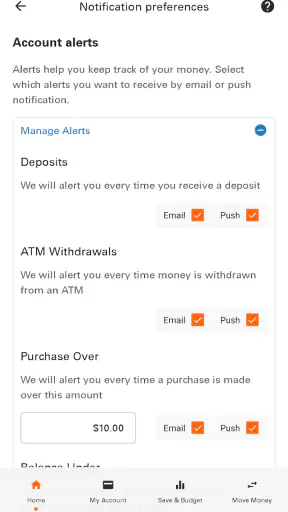
Notifications and previews are another area where user choice matters. If account-related messages appear on a lock screen, anyone who can see the phone may learn that an account event occurred. I would review the phone’s notification settings and choose a level of visibility that matches my circumstances. This is not a claim about a particular notification design; it is a practical privacy check I would make whenever using a financial application.
I would also avoid entering account details while connected to an untrusted public network. If I urgently needed to check information in a café, airport, or hotel, I would prefer a private connection or wait until I could use one. The app’s convenience should not encourage careless handling of credentials. A finance tool is only as safe as the surrounding habits of the person using it.
Shared phones require an additional decision. If another family member uses the device, I would make sure the app is not left open and that saved sign-in information is not exposed through the phone’s own settings. I would not assume that because the app is rated for Everyone, it is appropriate to leave financial information visible to everyone who uses the phone. The age rating describes general suitability, not permission to share an account.
Where the experience may feel limited
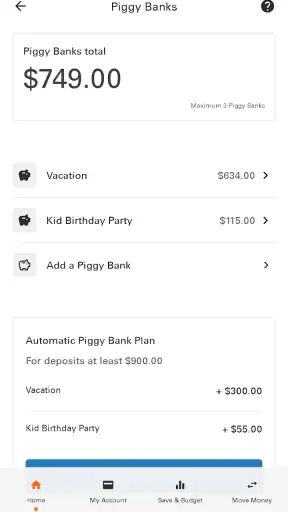
The app’s narrow purpose is its main strength, but it can also feel restrictive. If I want a complete picture of household finances, I would need another tool or separate account views. A specialized account app is unlikely to replace a spreadsheet, a budgeting application, or a bank’s broader online service for users who need planning and analysis.
The average rating also tells me to keep expectations measured. I would not assume that every account question can be solved inside the app or that every user will find the mobile experience smooth. Finance applications can be affected by account status, authentication, device settings, network conditions, and the way information is posted to an account. When the app does not answer a question clearly, the right response is to use the official support route, not to guess based on a partial screen.
Another trade-off is the difference between quick access and complete context. A mobile view is excellent when I need a fast check, but a larger screen may be easier for carefully reviewing several entries or keeping notes. I would use the app for timely awareness and switch to a more detailed channel when I needed to investigate a complicated issue. That division of labor feels more realistic than expecting one small-screen app to handle every financial task equally well.
Who will benefit most from it
I would recommend Money Network Mobile App first to people who already use a Money Network account and want a convenient mobile checkpoint. It makes the most sense for someone who checks account information while away from home, wants to review activity soon after using the account, or prefers an app to a browser for routine access.
It may also suit users who do not need elaborate financial planning. If my goal is simply to stay aware of the account connected to Money Network, a focused application can be less distracting than a large finance platform filled with unrelated charts and integrations. The app’s free price removes a purchase decision, so the more important question is whether the account relationship matches the app’s purpose.
I would be more cautious about recommending it to someone who expects a full banking replacement. If I need detailed budgeting, multiple institutions in one dashboard, investment tracking, or advanced financial reports, I would choose a service designed around those jobs. I would also avoid relying on this app alone for urgent disputes or situations where an official account representative must verify information.
Practical habits that improve the experience
My preferred setup would begin with a clean installation from the official publisher, followed by a deliberate sign-in rather than rushing through the first launch. I would confirm that the account shown is the one I expect, review the phone’s lock and notification settings, and avoid using the app on a device that other people can freely access.
For everyday use, I would check before a purchase only when the decision is important, then review activity afterward when several transactions have accumulated. I would keep a short note of anything unfamiliar instead of relying on memory. If the account view and my own records disagree, I would investigate through the official channel and avoid making a second transaction simply to test whether the first one worked.
I would also update the app when a new version is offered through the legitimate app store, while remembering that updating does not replace basic account security. The listed minimum Android requirement is 7.0, which supports use on a wide range of devices, but I would still prefer a phone capable of receiving current security updates. Compatibility is helpful; current device protection is more important.
One final tip is to decide in advance what information I am comfortable viewing in public. If the account is used for regular spending, it is easy to open the app casually and forget that the screen may contain sensitive details. Positioning the phone away from nearby eyes, hiding notification previews, and closing the app after checking it are small actions that preserve the convenience without treating privacy as an afterthought.
My cautious verdict
After reviewing its purpose and the way I would use it, I see Money Network Mobile App as a practical access point for an existing Money Network account, not a universal answer to personal finance. Its strongest quality is focus: it gives the right user a mobile place to stay aware of account information. Its main limitation is the same focus, because users seeking broad financial management will need other tools.
The app is free, carries an Everyone age rating, and has a long presence in the finance category. Those points make it easy to consider, but they should not replace personal judgment about account fit, privacy habits, and the quality of the experience on a particular device. The mixed average rating is a reason to test it calmly rather than assume perfection.
My recommendation is conditional but positive: if you already have a Money Network account and want straightforward mobile access, this app is worth trying with sensible security and privacy habits. I would keep expectations centered on account information, verify important details before acting, and use official support when something does not look right. If your priority is complete financial planning or managing several institutions together, I would choose a broader alternative instead.


